The WRLD Help Button makes submitting support tickets fast and easy. Pick your operating system below and follow the steps.
The download links below always point to the latest version of the Help Button, so you never need to hunt for an updated file.
Windows
macOS
1
Download the Installer
Download the Windows installer (.msi):
WRLD Help Button for Windows
Windows 10 and 11 · .msi installer · latest version
The file will download to your default save folder (usually Downloads).
2
Run the Installer
Double-click the downloaded .msi file to run it.
If Windows asks for permission, select Yes. You may need to right-click the file and choose Run as administrator, or ask your IT admin to approve the install.
3
Select a Function Key
When prompted, choose which function key (F1–F11) opens the Help Button.We recommend selecting F1 for quick access.
4
Restart Your Computer
The installer will ask you to restart. Select Yes to complete the installation.
Function key - Press the key you chose during install (for example F1)
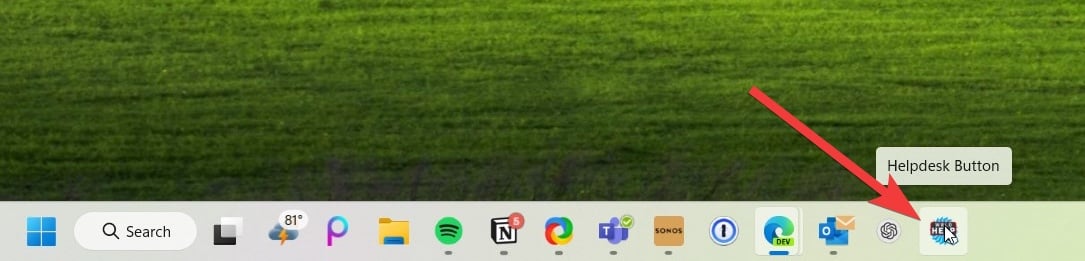
System tray - Right-click the tray icon
The Help Button pinned to the Windows taskbar
1
Download the Installer
Download the macOS installer (.pkg):
WRLD Help Button for macOS
macOS · .pkg installer · latest version
The file will download to your Downloads folder.
2
Run the Installer
Double-click the downloaded .pkg file and follow the prompts. Enter your Mac password when asked to allow the install.
3
Allow Screen Recording
The Help Button needs permission to capture screenshots for your ticket.
Open System Settings → Privacy & Security → Screen & System Audio Recording.
Click the + button and open the Applications folder.
Press ⌘ Command + Shift + G, type .Tier2SVC, and click Open.
Make sure the toggle next to .Tier2SVC is turned on.
Without this permission, screenshots can’t be attached to your tickets and the Include Screenshots option won’t appear.
4
Allow Input Monitoring
Repeat the same steps under System Settings → Privacy & Security → Input Monitoring, adding .Tier2SVC and turning the toggle on.This lets the Help Button capture the clicks leading up to your issue, so we can see exactly what happened.
5
Restart and Launch
Restart your Mac (or log out and back in) so the new permissions take effect. Then open the Help Button from your Applications folder, or press ⌘ Command + Space and search for Help.
When the Help Button captures your screen, macOS shows a purple indicator in the menu bar. This is normal. Newer versions of macOS may also ask you to re-confirm screen recording permission from time to time; select Allow to keep screenshots working.
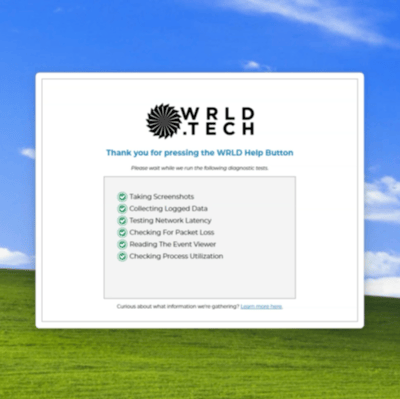
When you click the Help Button, it runs a quick set of diagnostics (screenshots, logs, network checks) so our team has everything needed to help you, with no screenshots or long explanations required from you.
The Help Button running its diagnostic checks
Learn how to use the Help Button
See our guide on submitting tickets with the Help Button
{"docsConfig":{"theme":"mint","$schema":"https://mintlify.com/docs.json","name":"WRLD Tech Docs","description":"WRLD Docs, Help Center, Walkthroughs, and more!","colors":{"primary":"#2563EB","light":"#3B82F6","dark":"#1D4ED8"},"logo":{"light":"https://wrld.host/templates/lagom2/assets/img/logo/logo_big.1117628009.png","dark":"https://wrld.host/templates/lagom2/assets/img/logo/logo_big_inverse.1680786378.png","href":"https://help.wrld.tech"},"favicon":{"light":"https://mintcdn.com/wrld/IX49k5ta4IsKlAij/images/wrldlogo.svg?fit=max\u0026auto=format\u0026n=IX49k5ta4IsKlAij\u0026q=85\u0026s=74b050aea22318501af95c16946b2dca","dark":"https://mintcdn.com/wrld/IX49k5ta4IsKlAij/images/wrldlogo.svg?fit=max\u0026auto=format\u0026n=IX49k5ta4IsKlAij\u0026q=85\u0026s=74b050aea22318501af95c16946b2dca"},"api":{"url":"full","mdx":{"auth":{"method":"bearer"}}},"appearance":{"default":"system"},"background":{"decoration":"windows","color":{"light":"#ececec","dark":"#161616"}},"navbar":{"links":[{"href":"mailto:helpdesk@wrld.tech","label":"Email Support"},{"href":"/support/submit-ticket","label":"Open Ticket"}],"primary":{"type":"button","label":"Dashboard","href":"https://wrld.host/clientarea.php"}},"footer":{"socials":{"x":"https://x.com/wrldtechco","github":"https://github.com/wrldinc","linkedin":"https://linkedin.com/company/wrldtech","facebook":"https://facebook.com/wrldtechco","instagram":"https://instagram.com/wrldtech.co"},"links":[{"header":"Online Support","items":[{"label":"Submit Ticket","href":"/support/submit-ticket"},{"label":"Contact Support","href":"/support/contact"},{"label":"MSP Portal","href":"https://portal.wrld.tech"},{"label":"DIY Guides","href":"https://guides.wrld.tech"},{"label":"Existing Tickets","href":"https://portal.wrld.tech"}]},{"header":"WRLD [dot]","items":[{"label":"[dot] directory","href":"https://wrld.one"},{"label":"[dot] tech","href":"https://wrld.tech"},{"label":"[dot] host/cloud","href":"https://wrld.host"},{"label":"[dot] domains","href":"https://wrld.domains"},{"label":"[dot] AI [beta open]","href":"https://wrld.ai"},{"label":"[dot] design","href":"https://wrld.design"},{"label":"Help Center","href":"https://help.wrld.tech"},{"label":"Network Status","href":"https://status.wrld.host"}]},{"header":"About \u0026 More","items":[{"label":"About WRLD","href":"https://wrld.tech/about"},{"label":"Contact Team","href":"https://wrld.tech/contact"},{"label":"Partners / Vendors","href":"https://wrld.one/partners"}]}]},"seo":{"indexing":"navigable"},"fonts":{"heading":{"family":"Montserrat"},"body":{"family":"Ubuntu"}},"icons":{"library":"lucide"},"styling":{"eyebrows":"section","latex":false},"integrations":{"gtm":{"tagId":"GTM-KX6MKJ2"},"posthog":{"apiKey":"phc_XFbSeJvyouqof8HEF1ysTL7pEiYm8TsmQdBr3tE77WU","apiHost":"https://us.i.posthog.com","sessionRecording":true},"telemetry":{"enabled":true}},"contextual":{"options":["copy","view","chatgpt","claude","cursor","vscode","grok","mcp","add-mcp","download-pdf"],"display":"header"},"navigation":{"global":{"anchors":[{"anchor":"WRLD.one [Directory]","icon":"compass","href":"https://wrld.one"},{"anchor":"WRLD.news [Blog]","icon":"newspaper","href":"https://wrld.news"},{"anchor":"WRLD.tech","icon":"cpu","href":"https://wrld.tech"},{"anchor":"WRLD.host","icon":"server","href":"https://wrld.host"},{"anchor":"WRLD.domains","icon":"globe","href":"https://wrld.domains"},{"anchor":"WRLD.design","icon":"palette","href":"https://wrld.design"},{"anchor":"WRLD.AI","icon":"bot","href":"https://wrld.ai"},{"anchor":"Status","icon":"signal","href":"https://status.wrld.host"}]},"pages":[]}},"deployment":{"deploymentMetadataValue":{"subdomain":"wrld","hasAudioNarration":false,"actualSubdomain":"wrld","customDomains":["help.wrld.tech"],"gitSource":{"type":"github","owner":"wrldinc","repo":"docs","deployBranch":"main","contentDirectory":"","isPrivate":true,"mountPath":"","label":""},"chroma":{"liveDeploymentHistoryId":"6ad5f2a091471779d28c0141","collectionId":"6cc06eda-67b7-4f1f-82ff-1ba4d8da0eea","schemaVersion":"v3","latestBuiltDeploymentHistoryId":"6ad5f2a091471779d28c0141"},"feedback":{"thumbs":true},"entitlements":{},"buildId":"6ad5f2a091471779d28c0141","clientVersion":"0.0.3908","searchFilterCounts":[{"language":"default","tag":"WRLD.Support","count":16},{"language":"default","tag":"WRLD.AI","count":5},{"language":"default","tag":"VPN Setup","count":5},{"language":"default","tag":"AI Coding Tools","count":4},{"language":"default","tag":"WRLD.host","count":4},{"language":"default","tag":"Tickets","count":4},{"language":"default","tag":"Security","count":4},{"language":"default","tag":"Overview","count":3},{"language":"default","tag":"Getting Started","count":3},{"language":"default","tag":"WRLD.design","count":3}],"searchSettings":{"maxResults":8,"showContentSnippets":true}},"assistantConfig":{"enableAskAiButton":false,"enableStarterQuestions":false,"enableAskAiSearchBar":true},"hasChatPermissions":false,"hasWebMcpPermissions":false,"toggles":[{"name":"kill-isr","enabled":true,"variant":{"name":"disabled","enabled":false,"feature_enabled":true},"impressionData":false},{"name":"agent-mintlify-slack","enabled":true,"variant":{"name":"disabled","enabled":false,"feature_enabled":true},"impressionData":false},{"name":"editor-v7-file-tree","enabled":true,"variant":{"name":"disabled","enabled":false,"feature_enabled":true},"impressionData":false},{"name":"agent-integrations-settings","enabled":true,"variant":{"name":"disabled","enabled":false,"feature_enabled":true},"impressionData":false},{"name":"automations-pr-grouping","enabled":true,"variant":{"name":"disabled","enabled":false,"feature_enabled":true},"impressionData":false},{"name":"custom-prefix","enabled":true,"variant":{"name":"disabled","enabled":false,"feature_enabled":true},"impressionData":false},{"name":"analytics-v7","enabled":true,"variant":{"name":"disabled","enabled":false,"feature_enabled":true},"impressionData":false},{"name":"user-flows-analytics","enabled":true,"variant":{"name":"disabled","enabled":false,"feature_enabled":true},"impressionData":false},{"name":"no-publish-flow","enabled":true,"variant":{"name":"disabled","enabled":false,"feature_enabled":true},"impressionData":false},{"name":"workos-onboarding","enabled":true,"variant":{"name":"disabled","enabled":false,"feature_enabled":true},"impressionData":false},{"name":"llms-txt-v2","enabled":true,"variant":{"name":"disabled","enabled":false,"feature_enabled":true},"impressionData":false},{"name":"pause-universal-search-reconcile","enabled":true,"variant":{"name":"disabled","enabled":false,"feature_enabled":true},"impressionData":false},{"name":"snapshot-serving-live","enabled":true,"variant":{"name":"disabled","enabled":false,"feature_enabled":true},"impressionData":false},{"name":"stripTemperatureMiddleware","enabled":true,"variant":{"name":"disabled","enabled":false,"feature_enabled":true},"impressionData":false},{"name":"per-site-search-delta","enabled":true,"variant":{"name":"disabled","enabled":false,"feature_enabled":true},"impressionData":false},{"name":"support-platform-pylon-zendesk","enabled":true,"variant":{"name":"disabled","enabled":false,"feature_enabled":true},"impressionData":false},{"name":"editor-branches-v2-autocommit","enabled":true,"variant":{"name":"disabled","enabled":false,"feature_enabled":true},"impressionData":false},{"name":"editor-branches-v2","enabled":true,"variant":{"name":"disabled","enabled":false,"feature_enabled":true},"impressionData":false},{"name":"snapshot-serving","enabled":true,"variant":{"name":"disabled","enabled":false,"feature_enabled":true},"impressionData":false},{"name":"instant-rollback","enabled":true,"variant":{"name":"disabled","enabled":false,"feature_enabled":true},"impressionData":false},{"name":"granular-notifications-server","enabled":true,"variant":{"name":"disabled","enabled":false,"feature_enabled":true},"impressionData":false},{"name":"granular-notifications","enabled":true,"variant":{"name":"disabled","enabled":false,"feature_enabled":true},"impressionData":false},{"name":"editor-private-page-search","enabled":true,"variant":{"name":"disabled","enabled":false,"feature_enabled":true},"impressionData":false},{"name":"automations-fable","enabled":true,"variant":{"name":"disabled","enabled":false,"feature_enabled":true},"impressionData":false},{"name":"fixed-ai-action-pricing","enabled":true,"variant":{"name":"disabled","enabled":false,"feature_enabled":true},"impressionData":false},{"name":"automation-resolve-merge-conflict","enabled":true,"variant":{"name":"disabled","enabled":false,"feature_enabled":true},"impressionData":false},{"name":"scoped-publishing","enabled":true,"variant":{"name":"disabled","enabled":false,"feature_enabled":true},"impressionData":false},{"name":"mintql","enabled":true,"variant":{"name":"disabled","enabled":false,"feature_enabled":true},"impressionData":false},{"name":"page-level-analytics","enabled":true,"variant":{"name":"disabled","enabled":false,"feature_enabled":true},"impressionData":false},{"name":"teamspace","enabled":true,"variant":{"name":"disabled","enabled":false,"feature_enabled":true},"impressionData":false},{"name":"editor-version-history-v2","enabled":true,"variant":{"name":"disabled","enabled":false,"feature_enabled":true},"impressionData":false},{"name":"vite-origin","enabled":true,"variant":{"name":"disabled","enabled":false,"feature_enabled":true},"impressionData":false},{"name":"editor-nav-generations","enabled":true,"variant":{"name":"disabled","enabled":false,"feature_enabled":true},"impressionData":false},{"name":"billing-page-v2","enabled":true,"variant":{"name":"disabled","enabled":false,"feature_enabled":true},"impressionData":false},{"name":"workspace-projects","enabled":true,"variant":{"name":"disabled","enabled":false,"feature_enabled":true},"impressionData":false},{"name":"assistant-v5","enabled":true,"variant":{"name":"disabled","enabled":false,"feature_enabled":true},"impressionData":false},{"name":"byok-sep-25","enabled":true,"variant":{"name":"disabled","enabled":false,"feature_enabled":true},"impressionData":false},{"name":"fork-pr-previews","enabled":true,"variant":{"name":"disabled","enabled":false,"feature_enabled":true},"impressionData":false},{"name":"revalidation-jwt","enabled":true,"variant":{"name":"disabled","enabled":false,"feature_enabled":true},"impressionData":false},{"name":"editor-agent-model-picker","enabled":true,"variant":{"name":"disabled","enabled":false,"feature_enabled":true},"impressionData":false},{"name":"client-snapshot-docs-config","enabled":true,"variant":{"name":"disabled","enabled":false,"feature_enabled":true},"impressionData":false},{"name":"hobby-abuse-scan","enabled":true,"variant":{"name":"disabled","enabled":false,"feature_enabled":true},"impressionData":false},{"name":"dashboard-inbox","enabled":true,"variant":{"name":"disabled","enabled":false,"feature_enabled":true},"impressionData":false}],"isAtlas":false,"googleFontsInlined":true},"customCss":[],"page":{"pagePath":"support/tickets/help-button-install","slug":"/support/tickets/help-button-install","pageMetadata":{"title":"Install the WRLD Help Button","description":"Self-install walkthrough for the WRLD Help Desk Button on Windows and macOS","href":"/support/tickets/help-button-install"},"description":{"compiledSource":"\"use strict\";\nconst {jsx: _jsx} = arguments[0];\nconst {useMDXComponents: _provideComponents} = arguments[0];\nfunction _createMdxContent(props) {\n const _components = {\n p: \"p\",\n ..._provideComponents(),\n ...props.components\n };\n return _jsx(_components.p, {\n children: \"Self-install walkthrough for the WRLD Help Desk Button on Windows and macOS\"\n });\n}\nfunction MDXContent(props = {}) {\n const {wrapper: MDXLayout} = {\n ..._provideComponents(),\n ...props.components\n };\n return MDXLayout ? _jsx(MDXLayout, {\n ...props,\n children: _jsx(_createMdxContent, {\n ...props\n })\n }) : _createMdxContent(props);\n}\nreturn {\n default: MDXContent\n};\n","frontmatter":{},"scope":{}},"pageType":"default","mdx":{"mdxSource":{"compiledSource":"\"use strict\";const{Fragment:_Fragment,jsx:_jsx,jsxs:_jsxs}=arguments[0];const{useMDXComponents:_provideComponents}=arguments[0];function _createMdxContent(props){const _components={a:`a`,code:`code`,li:`li`,ol:`ol`,p:`p`,strong:`strong`,ul:`ul`,..._provideComponents(),...props.components},{Card,Frame,Heading,Note,OptimizedImage,Step,Steps,Tab,Tabs,Tip,Warning}=_components;if(!Card)_missingMdxReference(`Card`,true);if(!Frame)_missingMdxReference(`Frame`,true);if(!Heading)_missingMdxReference(`Heading`,true);if(!Note)_missingMdxReference(`Note`,true);if(!OptimizedImage)_missingMdxReference(`OptimizedImage`,true);if(!Step)_missingMdxReference(`Step`,true);if(!Steps)_missingMdxReference(`Steps`,true);if(!Tab)_missingMdxReference(`Tab`,true);if(!Tabs)_missingMdxReference(`Tabs`,true);if(!Tip)_missingMdxReference(`Tip`,true);if(!Warning)_missingMdxReference(`Warning`,true);return _jsxs(_Fragment,{children:[_jsx(OptimizedImage,{src:`https://mintcdn.com/wrld/22NyYuw1a6CFB3nD/images/help-button/help-button-icon.png?fit=max\u0026auto=format\u0026n=22NyYuw1a6CFB3nD\u0026q=85\u0026s=de25a561cc05e635e998f507c2905ef7`,alt:`WRLD Help Button icon`,width:`120`,\"data-og-width\":`1024`,\"data-og-height\":`1024`,\"data-path\":`images/help-button/help-button-icon.png`,\"data-optimize\":`true`,\"data-opv\":`3`,srcset:`https://mintcdn.com/wrld/22NyYuw1a6CFB3nD/images/help-button/help-button-icon.png?w=280\u0026fit=max\u0026auto=format\u0026n=22NyYuw1a6CFB3nD\u0026q=85\u0026s=32a8adf0e9da5ade91d9799fbdad222f 280w, https://mintcdn.com/wrld/22NyYuw1a6CFB3nD/images/help-button/help-button-icon.png?w=560\u0026fit=max\u0026auto=format\u0026n=22NyYuw1a6CFB3nD\u0026q=85\u0026s=0121632b91be49ddc4e7a5d39e7e6448 560w, https://mintcdn.com/wrld/22NyYuw1a6CFB3nD/images/help-button/help-button-icon.png?w=840\u0026fit=max\u0026auto=format\u0026n=22NyYuw1a6CFB3nD\u0026q=85\u0026s=c2d87be1363e19772c102da87214e91e 840w, https://mintcdn.com/wrld/22NyYuw1a6CFB3nD/images/help-button/help-button-icon.png?w=1100\u0026fit=max\u0026auto=format\u0026n=22NyYuw1a6CFB3nD\u0026q=85\u0026s=13bc72329fe61c4b9513f0c433f09b32 1100w, https://mintcdn.com/wrld/22NyYuw1a6CFB3nD/images/help-button/help-button-icon.png?w=1650\u0026fit=max\u0026auto=format\u0026n=22NyYuw1a6CFB3nD\u0026q=85\u0026s=4423983b2bcb242ad3c53383fe82a805 1650w, https://mintcdn.com/wrld/22NyYuw1a6CFB3nD/images/help-button/help-button-icon.png?w=2500\u0026fit=max\u0026auto=format\u0026n=22NyYuw1a6CFB3nD\u0026q=85\u0026s=46599d5dec32b58b5d1c3cf046604248 2500w`}),`\n`,_jsx(Heading,{level:`2`,id:`download-\u0026-install`,children:`Download \u0026 Install`}),`\n`,_jsx(_components.p,{children:`The WRLD Help Button makes submitting support tickets fast and easy. Pick your operating system below and follow the steps.`}),`\n`,_jsx(Tip,{children:_jsx(_components.p,{children:`The download links below always point to the latest version of the Help Button, so you never need to hunt for an updated file.`})}),`\n`,_jsxs(Tabs,{children:[_jsxs(Tab,{title:`Windows`,icon:`windows`,id:`windows`,\"data-child-heading-ids\":`[\"where-to-find-it-on-windows\"]`,children:[_jsxs(Steps,{children:[_jsxs(Step,{title:`Download the Installer`,children:[_jsxs(_components.p,{children:[`Download the Windows installer (`,_jsx(_components.code,{children:`.msi`}),`):`]}),_jsx(Card,{title:`WRLD Help Button for Windows`,icon:`download`,href:`https://static.helpdeskbuttons.com/get_msi?userid=a3f5ef7d2e583f3e4c581a`,children:_jsxs(_components.p,{children:[`Windows 10 and 11 · `,_jsx(_components.code,{children:`.msi`}),` installer · latest version`]})}),_jsxs(_components.p,{children:[`The file will download to your default save folder (usually `,_jsx(_components.strong,{children:`Downloads`}),`).`]})]}),_jsxs(Step,{title:`Run the Installer`,children:[_jsxs(_components.p,{children:[`Double-click the downloaded `,_jsx(_components.code,{children:`.msi`}),` file to run it.`]}),_jsx(Note,{children:_jsxs(_components.p,{children:[`If Windows asks for permission, select `,_jsx(_components.strong,{children:`Yes`}),`. You may need to right-click the file and choose `,_jsx(_components.strong,{children:`Run as administrator`}),`, or ask your IT admin to approve the install.`]})})]}),_jsxs(Step,{title:`Select a Function Key`,children:[_jsx(_components.p,{children:`When prompted, choose which function key (F1–F11) opens the Help Button.`}),_jsxs(_components.p,{children:[_jsx(_components.strong,{children:`We recommend selecting F1`}),` for quick access.`]})]}),_jsx(Step,{title:`Restart Your Computer`,children:_jsxs(_components.p,{children:[`The installer will ask you to restart. Select `,_jsx(_components.strong,{children:`Yes`}),` to complete the installation.`]})})]}),_jsx(Heading,{level:`3`,id:`where-to-find-it-on-windows`,children:`Where to find it on Windows`}),_jsxs(_components.ul,{children:[`\n`,_jsxs(_components.li,{children:[_jsx(_components.strong,{children:`Taskbar`}),` - Look for the WRLD logo with “HELP”`]}),`\n`,_jsxs(_components.li,{children:[_jsx(_components.strong,{children:`Desktop`}),` - Icon alongside your other desktop icons`]}),`\n`,_jsxs(_components.li,{children:[_jsx(_components.strong,{children:`Function key`}),` - Press the key you chose during install (for example `,_jsx(_components.strong,{children:`F1`}),`)`]}),`\n`,_jsxs(_components.li,{children:[_jsx(_components.strong,{children:`System tray`}),` - Right-click the tray icon`]}),`\n`]}),_jsx(Frame,{caption:`The Help Button pinned to the Windows taskbar`,children:_jsx(OptimizedImage,{src:`https://mintcdn.com/wrld/22NyYuw1a6CFB3nD/images/help-button/taskbar.jpg?fit=max\u0026auto=format\u0026n=22NyYuw1a6CFB3nD\u0026q=85\u0026s=7cf22584783f5e382bb14696a3eb8441`,alt:`WRLD Help Button in the Windows taskbar`,\"data-og-width\":`1085`,width:`1085`,\"data-og-height\":`261`,height:`261`,\"data-path\":`images/help-button/taskbar.jpg`,\"data-optimize\":`true`,\"data-opv\":`3`,srcset:`https://mintcdn.com/wrld/22NyYuw1a6CFB3nD/images/help-button/taskbar.jpg?w=280\u0026fit=max\u0026auto=format\u0026n=22NyYuw1a6CFB3nD\u0026q=85\u0026s=d3a60bbb269669433ede0a90a89c9bff 280w, https://mintcdn.com/wrld/22NyYuw1a6CFB3nD/images/help-button/taskbar.jpg?w=560\u0026fit=max\u0026auto=format\u0026n=22NyYuw1a6CFB3nD\u0026q=85\u0026s=d02e9b11d3520394846ea2152463b7e6 560w, https://mintcdn.com/wrld/22NyYuw1a6CFB3nD/images/help-button/taskbar.jpg?w=840\u0026fit=max\u0026auto=format\u0026n=22NyYuw1a6CFB3nD\u0026q=85\u0026s=56b916458f421c3154fec1162dcfe023 840w, https://mintcdn.com/wrld/22NyYuw1a6CFB3nD/images/help-button/taskbar.jpg?w=1100\u0026fit=max\u0026auto=format\u0026n=22NyYuw1a6CFB3nD\u0026q=85\u0026s=c184aee0f682c74b949ecc43458fc5b5 1100w, https://mintcdn.com/wrld/22NyYuw1a6CFB3nD/images/help-button/taskbar.jpg?w=1650\u0026fit=max\u0026auto=format\u0026n=22NyYuw1a6CFB3nD\u0026q=85\u0026s=992c0ab6def074a956f3247a2b3bf556 1650w, https://mintcdn.com/wrld/22NyYuw1a6CFB3nD/images/help-button/taskbar.jpg?w=2500\u0026fit=max\u0026auto=format\u0026n=22NyYuw1a6CFB3nD\u0026q=85\u0026s=0dcc39ecd032433290b4be355fe71c02 2500w`})})]}),_jsxs(Tab,{title:`macOS`,icon:`apple`,id:`macos`,children:[_jsxs(Steps,{children:[_jsxs(Step,{title:`Download the Installer`,children:[_jsxs(_components.p,{children:[`Download the macOS installer (`,_jsx(_components.code,{children:`.pkg`}),`):`]}),_jsx(Card,{title:`WRLD Help Button for macOS`,icon:`download`,href:`https://static.helpdeskbuttons.com/get_pkg?userid=a3f5ef7d2e583f3e4c581a`,children:_jsxs(_components.p,{children:[`macOS · `,_jsx(_components.code,{children:`.pkg`}),` installer · latest version`]})}),_jsxs(_components.p,{children:[`The file will download to your `,_jsx(_components.strong,{children:`Downloads`}),` folder.`]})]}),_jsx(Step,{title:`Run the Installer`,children:_jsxs(_components.p,{children:[`Double-click the downloaded `,_jsx(_components.code,{children:`.pkg`}),` file and follow the prompts. Enter your Mac password when asked to allow the install.`]})}),_jsxs(Step,{title:`Allow Screen Recording`,children:[_jsx(_components.p,{children:`The Help Button needs permission to capture screenshots for your ticket.`}),_jsxs(_components.ol,{children:[`\n`,_jsxs(_components.li,{children:[`Open `,_jsx(_components.strong,{children:`System Settings`}),` → `,_jsx(_components.strong,{children:`Privacy \u0026 Security`}),` → `,_jsx(_components.strong,{children:`Screen \u0026 System Audio Recording`}),`.`]}),`\n`,_jsxs(_components.li,{children:[`Click the `,_jsx(_components.strong,{children:`+`}),` button and open the `,_jsx(_components.strong,{children:`Applications`}),` folder.`]}),`\n`,_jsxs(_components.li,{children:[`Press `,_jsx(_components.strong,{children:`⌘ Command + Shift + G`}),`, type `,_jsx(_components.code,{children:`.Tier2SVC`}),`, and click `,_jsx(_components.strong,{children:`Open`}),`.`]}),`\n`,_jsxs(_components.li,{children:[`Make sure the toggle next to `,_jsx(_components.strong,{children:`.Tier2SVC`}),` is turned `,_jsx(_components.strong,{children:`on`}),`.`]}),`\n`]}),_jsx(Warning,{children:_jsxs(_components.p,{children:[`Without this permission, screenshots can’t be attached to your tickets and the `,_jsx(_components.strong,{children:`Include Screenshots`}),` option won’t appear.`]})})]}),_jsxs(Step,{title:`Allow Input Monitoring`,children:[_jsxs(_components.p,{children:[`Repeat the same steps under `,_jsx(_components.strong,{children:`System Settings`}),` → `,_jsx(_components.strong,{children:`Privacy \u0026 Security`}),` → `,_jsx(_components.strong,{children:`Input Monitoring`}),`, adding `,_jsx(_components.code,{children:`.Tier2SVC`}),` and turning the toggle `,_jsx(_components.strong,{children:`on`}),`.`]}),_jsx(_components.p,{children:`This lets the Help Button capture the clicks leading up to your issue, so we can see exactly what happened.`})]}),_jsx(Step,{title:`Restart and Launch`,children:_jsxs(_components.p,{children:[`Restart your Mac (or log out and back in) so the new permissions take effect. Then open the Help Button from your `,_jsx(_components.strong,{children:`Applications`}),` folder, or press `,_jsx(_components.strong,{children:`⌘ Command + Space`}),` and search for `,_jsx(_components.strong,{children:`Help`}),`.`]})})]}),_jsx(Note,{children:_jsxs(_components.p,{children:[`When the Help Button captures your screen, macOS shows a purple indicator in the menu bar. This is normal. Newer versions of macOS may also ask you to re-confirm screen recording permission from time to time; select `,_jsx(_components.strong,{children:`Allow`}),` to keep screenshots working.`]})})]})]}),`\n`,_jsx(Heading,{level:`2`,id:`after-installation`,children:`After Installation`}),`\n`,_jsx(_components.p,{children:`When you click the Help Button, it runs a quick set of diagnostics (screenshots, logs, network checks) so our team has everything needed to help you, with no screenshots or long explanations required from you.`}),`\n`,_jsx(Frame,{caption:`The Help Button running its diagnostic checks`,children:_jsx(OptimizedImage,{src:`https://mintcdn.com/wrld/22NyYuw1a6CFB3nD/images/help-button/diagnostics.png?fit=max\u0026auto=format\u0026n=22NyYuw1a6CFB3nD\u0026q=85\u0026s=df8ed83735c110e6884f82f5ea915546`,alt:`WRLD Help Button running diagnostic tests`,\"data-og-width\":`400`,width:`400`,\"data-og-height\":`399`,height:`399`,\"data-path\":`images/help-button/diagnostics.png`,\"data-optimize\":`true`,\"data-opv\":`3`,srcset:`https://mintcdn.com/wrld/22NyYuw1a6CFB3nD/images/help-button/diagnostics.png?w=280\u0026fit=max\u0026auto=format\u0026n=22NyYuw1a6CFB3nD\u0026q=85\u0026s=4f82d03f814307e257b3e6caf42a0ff9 280w, https://mintcdn.com/wrld/22NyYuw1a6CFB3nD/images/help-button/diagnostics.png?w=560\u0026fit=max\u0026auto=format\u0026n=22NyYuw1a6CFB3nD\u0026q=85\u0026s=07092f37e5176305226dde73d9ffc2a0 560w, https://mintcdn.com/wrld/22NyYuw1a6CFB3nD/images/help-button/diagnostics.png?w=840\u0026fit=max\u0026auto=format\u0026n=22NyYuw1a6CFB3nD\u0026q=85\u0026s=f882a72ca592606a5684c685cab0948a 840w, https://mintcdn.com/wrld/22NyYuw1a6CFB3nD/images/help-button/diagnostics.png?w=1100\u0026fit=max\u0026auto=format\u0026n=22NyYuw1a6CFB3nD\u0026q=85\u0026s=a4ecd73b0927310ba6ed2d80ab9e0909 1100w, https://mintcdn.com/wrld/22NyYuw1a6CFB3nD/images/help-button/diagnostics.png?w=1650\u0026fit=max\u0026auto=format\u0026n=22NyYuw1a6CFB3nD\u0026q=85\u0026s=363680e2bb45ada76c24642f1002ed92 1650w, https://mintcdn.com/wrld/22NyYuw1a6CFB3nD/images/help-button/diagnostics.png?w=2500\u0026fit=max\u0026auto=format\u0026n=22NyYuw1a6CFB3nD\u0026q=85\u0026s=393f5b350ccb205170f96e3f57851e0a 2500w`})}),`\n`,_jsx(Card,{title:`Learn how to use the Help Button`,icon:`circle-help`,href:`/support/tickets/help-button`,children:_jsx(_components.p,{children:`See our guide on submitting tickets with the Help Button`})}),`\n`,_jsx(Heading,{level:`2`,id:`need-help`,children:`Need Help?`}),`\n`,_jsxs(_components.p,{children:[`If you run into issues during installation, contact us at `,_jsx(_components.a,{href:`mailto:helpdesk@wrld.tech`,children:`helpdesk@wrld.tech`}),`, call `,_jsx(_components.strong,{children:`469.299.9598`}),`, or `,_jsx(_components.a,{href:`/support/submit-ticket`,children:`submit a ticket in the client portal`}),`.`]})]})}function MDXContent(props={}){const{wrapper:MDXLayout}={..._provideComponents(),...props.components};return MDXLayout?_jsx(MDXLayout,{...props,children:_jsx(_createMdxContent,{...props})}):_createMdxContent(props)}return{default:MDXContent};function _missingMdxReference(id,component){throw new Error(`Expected `+(component?`component`:`object`)+\" `\"+id+\"` to be defined: you likely forgot to import, pass, or provide it.\")}","frontmatter":{},"scope":{"config":{},"pageMetadata":{"title":"Install the WRLD Help Button","description":"Self-install walkthrough for the WRLD Help Desk Button on Windows and macOS","href":"/support/tickets/help-button-install"}}},"mdxSourceWithNoJs":null},"mdxExtracts":{"tableOfContents":[{"title":"Download \u0026 Install","slug":"download-\u0026-install","depth":2,"children":[{"title":"Where to find it on Windows","slug":"where-to-find-it-on-windows","depth":3,"children":[],"tabId":"windows"}]},{"title":"After Installation","slug":"after-installation","depth":2,"children":[]},{"title":"Need Help?","slug":"need-help","depth":2,"children":[]}],"codeExamples":{}},"jsLinks":["/_mintlify/custom/wrld/44129c2b4f0d85ad/gleap.js"],"subdomain":"wrld","siteName":"WRLD Tech Docs","title":"Install the WRLD Help Button - WRLD Tech Docs","navMaps":{"firstHrefInVersion":{},"firstHrefInLanguage":{}},"lastModified":"2026-10-19T10:36:35.646Z","originalFileLocation":"support/tickets/help-button-install.mdx"},"headHtml":"\u003cscript data-mint-head>(function(){var d=document.documentElement,p=null;if(!p){try{p=localStorage.getItem(\"isDarkMode\")}catch(e){}if(p==='true')p='dark';else if(p==='false')p='light';if(p!=='light'\u0026\u0026p!=='dark'\u0026\u0026p!=='system')p=\"system\"}var r=p==='system'?(matchMedia(\"(prefers-color-scheme: dark)\").matches?'dark':'light'):p;d.classList.remove(r==='dark'?'light':'dark');d.classList.add(r);d.setAttribute(\"data-theme-preference\",p)})();\u003c/script>\u003cmeta data-mint-head name=\"description\" content=\"Self-install walkthrough for the WRLD Help Desk Button on Windows and macOS\">\u003cmeta data-mint-head name=\"application-name\" content=\"WRLD Tech Docs\">\u003cmeta data-mint-head name=\"generator\" content=\"Mintlify\">\u003clink data-mint-head rel=\"icon\" type=\"image/png\" sizes=\"192x192\" href=\"/mintlify-assets/_mintlify/favicons/wrld/CBsg93L62-VhmEXN/_generated/favicon/android-chrome-192x192.png\" media=\"(prefers-color-scheme: light)\">\u003clink data-mint-head rel=\"apple-touch-icon\" type=\"image/png\" sizes=\"180x180\" href=\"/mintlify-assets/_mintlify/favicons/wrld/CBsg93L62-VhmEXN/_generated/favicon/apple-touch-icon.png\">\u003clink data-mint-head rel=\"icon\" type=\"image/png\" sizes=\"16x16\" href=\"/mintlify-assets/_mintlify/favicons/wrld/CBsg93L62-VhmEXN/_generated/favicon/favicon-16x16.png\" media=\"(prefers-color-scheme: light)\">\u003clink data-mint-head rel=\"icon\" type=\"image/png\" sizes=\"32x32\" href=\"/mintlify-assets/_mintlify/favicons/wrld/CBsg93L62-VhmEXN/_generated/favicon/favicon-32x32.png\" media=\"(prefers-color-scheme: light)\">\u003clink data-mint-head rel=\"shortcut icon\" type=\"image/x-icon\" href=\"/mintlify-assets/_mintlify/favicons/wrld/CBsg93L62-VhmEXN/_generated/favicon/favicon.ico\" media=\"(prefers-color-scheme: light)\">\u003clink data-mint-head rel=\"icon\" type=\"image/png\" sizes=\"192x192\" href=\"/mintlify-assets/_mintlify/favicons/wrld/CBsg93L62-VhmEXN/_generated/favicon-dark/android-chrome-192x192.png\" media=\"(prefers-color-scheme: dark)\">\u003clink data-mint-head rel=\"icon\" type=\"image/png\" sizes=\"16x16\" href=\"/mintlify-assets/_mintlify/favicons/wrld/CBsg93L62-VhmEXN/_generated/favicon-dark/favicon-16x16.png\" media=\"(prefers-color-scheme: dark)\">\u003clink data-mint-head rel=\"icon\" type=\"image/png\" sizes=\"32x32\" href=\"/mintlify-assets/_mintlify/favicons/wrld/CBsg93L62-VhmEXN/_generated/favicon-dark/favicon-32x32.png\" media=\"(prefers-color-scheme: dark)\">\u003clink data-mint-head rel=\"shortcut icon\" type=\"image/x-icon\" href=\"/mintlify-assets/_mintlify/favicons/wrld/CBsg93L62-VhmEXN/_generated/favicon-dark/favicon.ico\" media=\"(prefers-color-scheme: dark)\">\u003cmeta data-mint-head property=\"og:title\" content=\"Install the WRLD Help Button - WRLD Tech Docs\">\u003cmeta data-mint-head property=\"og:description\" content=\"Self-install walkthrough for the WRLD Help Desk Button on Windows and macOS\">\u003cmeta data-mint-head property=\"og:site_name\" content=\"WRLD Tech Docs\">\u003cmeta data-mint-head property=\"og:url\" content=\"https://help.wrld.tech/support/tickets/help-button-install\">\u003cmeta data-mint-head property=\"og:type\" content=\"website\">\u003cmeta data-mint-head name=\"twitter:card\" content=\"summary_large_image\">\u003cmeta data-mint-head name=\"twitter:title\" content=\"Install the WRLD Help Button - WRLD Tech Docs\">\u003cmeta data-mint-head name=\"twitter:description\" content=\"Self-install walkthrough for the WRLD Help Desk Button on Windows and macOS\">\u003cmeta data-mint-head name=\"msapplication-config\" content=\"/mintlify-assets/_mintlify/favicons/wrld/CBsg93L62-VhmEXN/_generated/favicon/browserconfig.xml\">\u003cmeta data-mint-head name=\"apple-mobile-web-app-title\" content=\"WRLD Tech Docs\">\u003cmeta data-mint-head name=\"msapplication-TileColor\" content=\"#2563EB\">\u003clink data-mint-head rel=\"canonical\" href=\"https://help.wrld.tech/support/tickets/help-button-install\">\u003clink data-mint-head rel=\"alternate\" type=\"application/xml\" href=\"/sitemap.xml\">\u003clink data-mint-head rel=\"alternate\" type=\"text/markdown\" href=\"/support/tickets/help-button-install.md\">\u003cscript data-mint-head type=\"application/ld+json\">{\"@context\":\"https://schema.org\",\"@graph\":[{\"@type\":\"Organization\",\"@id\":\"https://help.wrld.tech/#organization\",\"name\":\"WRLD Tech Docs\",\"url\":\"https://help.wrld.tech\",\"logo\":{\"@type\":\"ImageObject\",\"url\":\"https://wrld.host/templates/lagom2/assets/img/logo/logo_big.1117628009.png\"}},{\"@type\":\"WebSite\",\"@id\":\"https://help.wrld.tech#website\",\"name\":\"WRLD Tech Docs\",\"url\":\"https://help.wrld.tech\",\"publisher\":{\"@id\":\"https://help.wrld.tech/#organization\"}},{\"@type\":\"WebPage\",\"@id\":\"https://help.wrld.tech/support/tickets/help-button-install#webpage\",\"url\":\"https://help.wrld.tech/support/tickets/help-button-install\",\"name\":\"Install the WRLD Help Button\",\"description\":\"Self-install walkthrough for the WRLD Help Desk Button on Windows and macOS\",\"dateModified\":\"2026-10-19T10:36:35.646Z\",\"isPartOf\":{\"@id\":\"https://help.wrld.tech#website\"},\"breadcrumb\":{\"@id\":\"https://help.wrld.tech/support/tickets/help-button-install#breadcrumb\"}},{\"@type\":\"BreadcrumbList\",\"@id\":\"https://help.wrld.tech/support/tickets/help-button-install#breadcrumb\",\"itemListElement\":[{\"@type\":\"ListItem\",\"position\":1,\"name\":\"Tickets\",\"item\":\"https://help.wrld.tech/support/submit-ticket\"},{\"@type\":\"ListItem\",\"position\":2,\"name\":\"Install the WRLD Help Button\",\"item\":\"https://help.wrld.tech/support/tickets/help-button-install\"}]},{\"@type\":[\"Article\",\"TechArticle\"],\"@id\":\"https://help.wrld.tech/support/tickets/help-button-install#article\",\"headline\":\"Install the WRLD Help Button\",\"name\":\"Install the WRLD Help Button\",\"description\":\"Self-install walkthrough for the WRLD Help Desk Button on Windows and macOS\",\"url\":\"https://help.wrld.tech/support/tickets/help-button-install\",\"mainEntityOfPage\":{\"@id\":\"https://help.wrld.tech/support/tickets/help-button-install#webpage\"},\"dateModified\":\"2026-10-19T10:36:35.646Z\",\"publisher\":{\"@id\":\"https://help.wrld.tech/#organization\"},\"isPartOf\":{\"@id\":\"https://help.wrld.tech#website\"}}]}\u003c/script>\u003cscript data-mint-head type=\"application/ld+json\">{\"@context\":\"https://schema.org\",\"@type\":\"WebSite\",\"name\":\"WRLD Tech Docs\",\"creator\":{\"@type\":\"Organization\",\"name\":\"Mintlify\",\"url\":\"https://mintlify.com\"}}\u003c/script>","siteName":"WRLD Tech Docs","nav":{"global":{"anchors":[{"anchor":"WRLD.one [Directory]","icon":"compass","href":"https://wrld.one"},{"anchor":"WRLD.news [Blog]","icon":"newspaper","href":"https://wrld.news"},{"anchor":"WRLD.tech","icon":"cpu","href":"https://wrld.tech"},{"anchor":"WRLD.host","icon":"server","href":"https://wrld.host"},{"anchor":"WRLD.domains","icon":"globe","href":"https://wrld.domains"},{"anchor":"WRLD.design","icon":"palette","href":"https://wrld.design"},{"anchor":"WRLD.AI","icon":"bot","href":"https://wrld.ai"},{"anchor":"Status","icon":"signal","href":"https://status.wrld.host"}]},"tabs":[{"tab":"Overview","pages":[{"title":"Overview","href":""}]},{"tab":"WRLD.tech","pages":[{"title":"WRLD.tech","href":"/wrld-tech/overview"}]},{"tab":"WRLD.host","pages":[{"title":"WRLD.host","href":"/wrld-host/overview"}]},{"tab":"WRLD.design","pages":[{"title":"WRLD.design","href":"/wrld-design/overview"}]},{"tab":"WRLD.Services","pages":[{"title":"WRLD.Services","href":"/onboarding/overview"}]},{"tab":"WRLD.Support","groups":[{"group":"Help Center","pages":[{"title":"WRLD.Support","href":"/support/overview"},{"title":"Contact Support","href":"/support/contact"},{"title":"Remote Support Sessions","href":"/support/remote-support"}]},{"group":"Tickets","pages":[{"title":"Submit a Ticket","href":"/support/submit-ticket"},{"title":"Client Portal Login","href":"/support/client-login"},{"title":"WRLD Help Button","description":"1-Click-and-Done Problem Resolution - Best Method for Getting Support","href":"/support/tickets/help-button"},{"title":"Install the WRLD Help Button","href":"/support/tickets/help-button-install"}]},{"group":"Security","pages":[{"title":"Security-First Support","description":"Security and privacy-first support practices","href":"/support/security/overview"},{"title":"Cloudflare Access (Zero Trust)","icon":"shield-check","href":"/support/security/cloudflare-access"},{"title":"Disable Limit IP Address Tracking (iOS)","href":"/support/security/ios-private-relay"},{"title":"SecureSend - Secure Password Sharing","href":"/tools/securesend"}]},{"group":"VPN Setup","pages":[{"title":"VPN Setup - Windows","href":"/support/security/vpn/windows"},{"title":"VPN Setup - macOS","href":"/support/security/vpn/macos"},{"title":"VPN Setup - iOS","href":"/support/security/vpn/ios"},{"title":"VPN Setup - Android","href":"/support/security/vpn/android"},{"title":"VPN Setup - Linux","href":"/support/security/vpn/linux"}]}]},{"tab":"WRLD.AI","pages":[{"title":"WRLD.AI","href":"/wrld-ai/overview"}]},{"tab":"Client Portal","icon":"layout-dashboard","href":"https://portal.wrld.tech"}]},"title":"Install the WRLD Help Button - WRLD Tech Docs","buildId":"dpl_CUnGQP1HgFUzoxatVC37y4zP83Vx","deploymentId":"dpl_CUnGQP1HgFUzoxatVC37y4zP83Vx","dynamics":["a74be98ba7","07c022d89b"],"chunks":["zoom-image-lightbox-DQ5W4Q2v.js","PlusIcon-jZ8vgk6R.js","lightbox-handle-r17bVUz3.js","Frame-BCFzRGe_.js","DynamicMarkdown-BUuAYxJE.js"]}